
See Where Your Budget and Actual Performance Diverge
Turn your Xero data into a clear Budget vs Actual dashboard. Compare Purchases and Sales across flexible reporting periods, examine results by account code and give managers read-only access to the budgets they are responsible for.
One-click Xero sync | Account-level breakdowns | Flexible date ranges | Controlled manager access
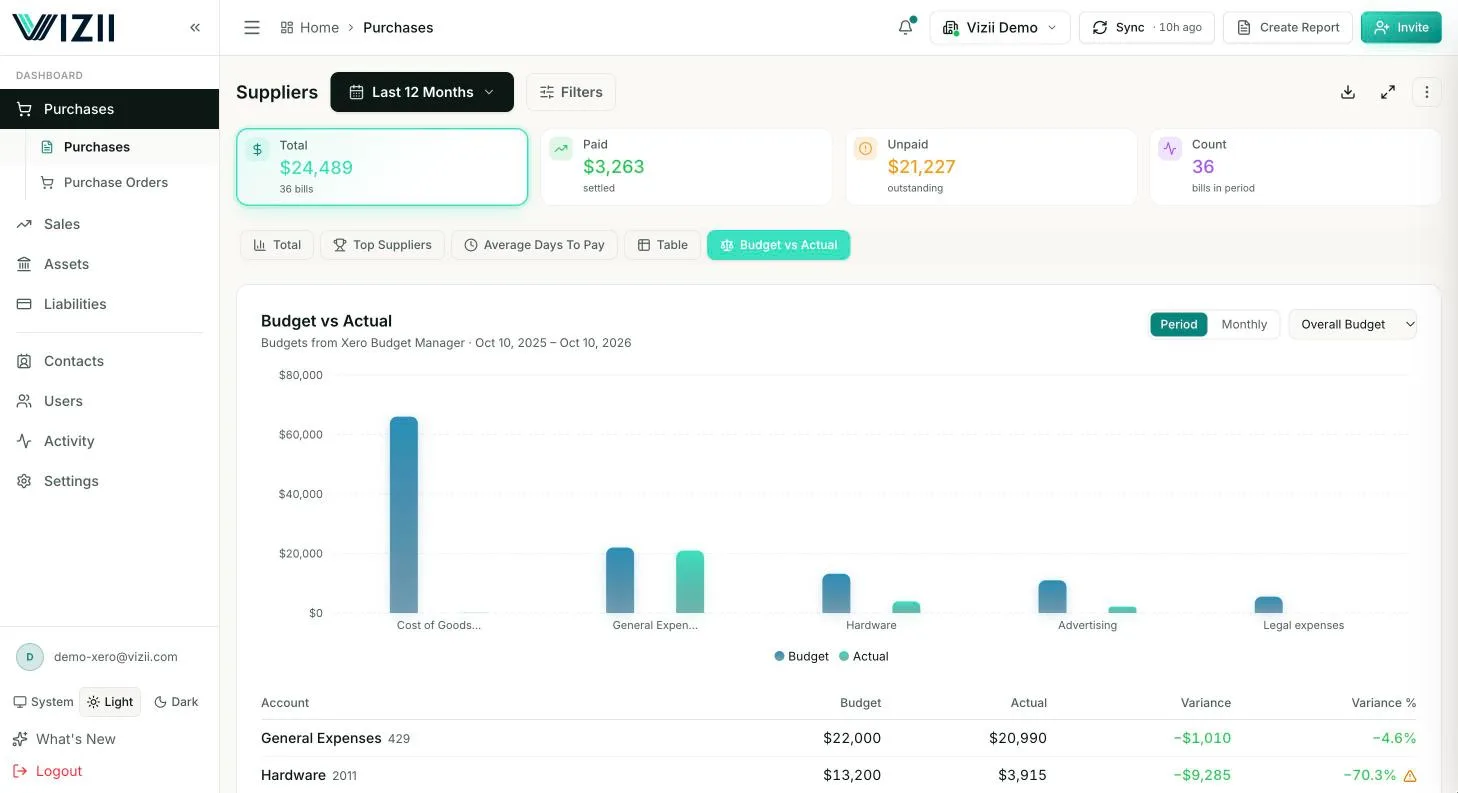
Budget vs Actual Reporting Should Reveal the Variance — Not Create More Work
Finance teams need to understand where performance differs from plan and which accounts caused the change. Static exports and manually updated spreadsheets make that analysis slower and harder to share.
Reports become outdated
An exported Budget vs Actual report stops reflecting performance as new transactions are posted.
Headline variances lack context
A total variance does not explain which income or expense accounts are responsible for the difference.
Spreadsheet analysis takes time
Finance teams must repeatedly export, combine and update financial data before they can investigate the result.
Managers receive too much or too little
Sharing the complete company report exposes unnecessary information, while a limited static file quickly becomes outdated.
Different reporting periods require rework
Monthly, quarterly and annual reviews often require preparing separate report versions.
Compare Budget and Actual Results Across Flexible Reporting Periods
Switch from a broad performance overview to the reporting period relevant to the decision. Vizii helps finance teams examine Budget vs Actual results without rebuilding a separate report for every review cycle.
Recent performance
Review how actual Purchases or Sales compare with the budget across the last 30 days or a custom date range.
Quarterly or annual views
Change the reporting period to review short-term movement, quarterly performance or the wider annual position — last 30 days, last 3, 6 or 12 months, last quarter, this year, last year, or a custom date range.
Custom date ranges
Select a custom period when the analysis does not match a standard reporting cycle.
Switch between financial views
Access Budget vs Actual as a switchable view under Purchases and Sales alongside the other dashboard perspectives.
Find the Accounts Behind Every Budget Variance
Move beyond the overall variance and examine the Xero account codes contributing to the result. Vizii helps finance teams identify where actual income or spending moved away from the plan.
Break results down by account code
Review Budget vs Actual performance across the relevant income or expense accounts.
Identify material variances
Focus attention on the accounts where the difference between budget and actual performance requires investigation.
Filter the financial view
Narrow the analysis by reporting period and the available account, tracking category, customer or supplier dimensions.
Drill into the result
Move from a summary view to the underlying financial detail to understand the numbers behind the variance.
Export when further analysis is needed
Export relevant financial data to Excel for additional modelling, documentation or offline review.
Give Each Budget Owner Visibility Into the Accounts They Manage
Share relevant Budget vs Actual performance with department managers and budget owners without exposing the complete company financials or requiring access to Xero.
Select the relevant accounts
Assign only the income or expense accounts connected to each manager's responsibilities.
Share Budget vs Actual as a permission
Give the invited user access to the Budget vs Actual view for the financial data included within their assigned scope.
Avoid dependence on tracking categories
Restrict visibility directly by specific accounts when Xero tracking categories are already used for another purpose.
Keep access read-only
Managers can review and explore assigned information without editing the underlying Xero data.
Use email-verified access
Each recipient verifies their invited email through a passwordless magic link and does not need a Xero login.
Review, Investigate and Share Budget Performance in One Workflow
Vizii keeps Budget vs Actual analysis connected to Xero, helping finance teams move from current performance to account-level investigation and controlled manager visibility.
Connect Xero
Authorise the Xero connection, then select Sync to pull the available financial data into Vizii.
Open Budget vs Actual
Switch to the Budget vs Actual view within Purchases or Sales.
Select the reporting period
Review performance across the last 30 days, last 3, 6 or 12 months, last quarter, this year, last year, or a custom date range.
Investigate the variance
Examine the account-code breakdown and drill into the relevant financial detail behind the result.
Share with the budget owner
Give the responsible manager a scoped, read-only view of the accounts they need to monitor.
One-click Xero sync | Flexible reporting periods | Account-level analysis | Controlled sharing
Help Finance Leaders and Budget Owners Work From the Same Current Numbers
Vizii gives finance teams the company-level visibility needed for oversight while giving individual managers access only to the budget information connected to their responsibilities.
CFOs and finance leaders
Monitor overall performance against budget, identify material variances and focus management attention on accounts requiring action.
Finance directors and finance operations teams
Reduce recurring spreadsheet preparation and investigate results across relevant reporting periods and account codes.
Department managers
Review actual spending against the budgets for assigned expense accounts without seeing unrelated departments.
Sales leaders
Compare actual sales performance with the available budget and explore relevant account-level results.
Business owners and directors
Understand where performance differs from plan through clearer financial views.
Accountants and bookkeepers
Prepare clearer Budget vs Actual conversations and share controlled, read-only views with clients or internal stakeholders.
Make Budget Reviews Easier to Update, Investigate and Share
Vizii connects Budget vs Actual analysis to your Xero data and gives finance teams a clearer route from identifying a variance to sharing the relevant result.
| Traditional approach | Limitation | Vizii approach |
|---|---|---|
| Exported report | Becomes outdated as transactions change | Xero data you refresh in one click |
| Spreadsheet calculations | Requires repeated preparation | Switchable Budget vs Actual view |
| Headline variance | Does not show the cause | Account-code breakdowns and drill-downs |
| Separate period reports | Creates multiple versions | Flexible reporting periods |
| Complete company report | Exposes unrelated data | Scoped manager views |
| Editable shared files | Can be changed or duplicated | Controlled, read-only access |
Finance sees the full performance picture. Each budget owner sees the accounts they are responsible for.
Questions About Budget vs Actual Reporting in Vizii
Yes. Budget vs Actual is available as a switchable view within Purchases and Sales.
Yes. Vizii supports account-code-level breakdowns for relevant income or expense accounts.
Vizii supports last 30 days, last 3, 6 or 12 months, last quarter, this year, last year, or a custom date range.
Yes. Filters and drill-downs help users move from the overall result to relevant account breakdowns and underlying detail.
Yes. Access can be restricted to selected accounts connected to their responsibilities.
No. Access can be scoped directly by account. Tracking categories are an additional option, not a requirement.
No. Invited recipients verify their email through a passwordless magic link and receive read-only access.
Sync the latest Xero data with one click whenever you want to review current performance — no exports or uploads.
Yes. Relevant financial data can be exported to Excel for additional analysis or documentation.
Turn Budget Differences Into Clear, Account-Level Answers
Connect Xero to Vizii to compare Budget vs Actual performance, investigate the accounts behind each variance and give every budget owner a controlled, read-only view.
One-click Xero sync | Flexible reporting periods | Account-level analysis | Controlled manager access